
A lost website does not always mean the end of your digital presence.
For businesses and professionals, a website represents credibility, visibility, and years of carefully built content. When it suddenly disappears because of hosting failures, hacking incidents, expired domains, accidental deletions, or missing backups, the impact is immediate and often overwhelming.
“When no backup exists, archived data can become the only surviving record of a website’s online history.”
In these situations, Wayback Machine website restoration is often the most reliable and realistic recovery option available when a website is lost and no backup exists. This guide explains how website restoration from Wayback Machine works in real-world scenarios. It is written from a professional, agency-level perspective and focuses on accuracy, SEO preservation, and long-term usability rather than shortcuts or automated tools.
Why Wayback Machine Website Restoration Matters
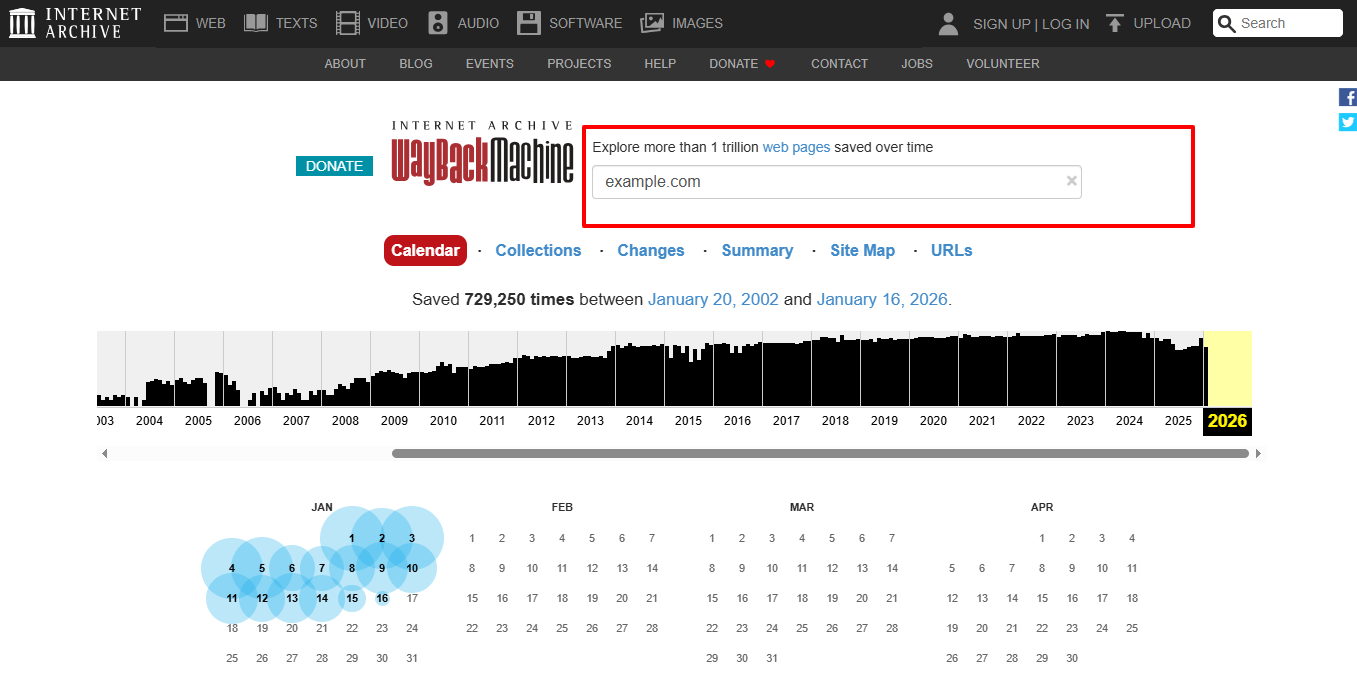
The Wayback Machine is part of the Internet Archive and continuously stores historical snapshots of publicly accessible websites. These archived versions often include complete pages, written content, images, and basic layout elements captured over time.
When a live website is permanently deleted and no server backup is available, these snapshots may still preserve the core content of the site. For many website owners, this archived data becomes the foundation for recovery.
You can view archived snapshots directly through the Wayback Machine archive.
Understanding What Can and Cannot Be Recovered
Before starting restoration, it is important to understand the limits of archived recovery. While public-facing pages are often recoverable, backend data and dynamic functionality are not stored by the Wayback Machine.
If you want a detailed explanation of recovery limitations, you can read our dedicated guide on what can and cannot be recovered from Wayback Machine.
That article explains clearly what content can usually be restored from archives and what must be rebuilt separately, helping you set realistic expectations from the start.
Determining Whether Your Website Is a Good Recovery Candidate
Not every website is suitable for Wayback-based restoration. A proper evaluation is essential before any recovery work begins.
This evaluation typically looks at:
- Whether archived snapshots exist for the domain
- Coverage of key pages such as the homepage, services, and blog posts
- Consistency of navigation and page structure
- Availability of images and media files
Websites that were publicly accessible and indexed by search engines are generally strong candidates for restoration.
Choosing the Right Archived Versions
Archived snapshots vary widely in quality. Some versions may be incomplete, broken, or captured during technical errors.
Professional restoration focuses on selecting archive versions that represent the website at its most complete and stable stage. Choosing the right snapshots prevents layout conflicts, missing pages, and navigation issues later in the process.
“Selecting the right archive versions is one of the most critical decisions in website restoration.”
Converting Archived Pages into Usable Website Content
Archived pages cannot simply be copied and published. They must be carefully extracted, cleaned, and structured.
This process typically involves recovering page text and headings, preserving internal links, extracting images and media files, and removing archive-related clutter. The goal is to maintain the original hierarchy and SEO signals while making the content usable in a modern website environment.
Rebuilding a Live Website from Archived Data
Once the content is recovered, it must be rebuilt into a functioning website. This is where archived data is transformed into a live platform.
Depending on the project, the restored website may be rebuilt as a WordPress site, a static HTML website, or another modern content management system. The focus at this stage is usability, performance, and long-term stability, not simply replicating archived pages.
Addressing Design Gaps and Missing Visual Elements
Archived websites often have missing images, fonts, or styling files. Without addressing these gaps, the restored website may look broken or unprofessional.
A professional restoration process includes rebuilding missing visuals, correcting layout inconsistencies, and ensuring the website displays properly on both desktop and mobile devices. Visual accuracy plays a major role in restoring user trust.
Rebuilding Website Functionality Separately
The Wayback Machine does not store databases or server-side functionality. Features such as contact forms, login systems, dashboards, and eCommerce components must be rebuilt manually.
“Archived content can be recovered, but functionality must be rebuilt.”
Separating content recovery from functionality rebuilding ensures better security, stability, and scalability for the restored website.
Preparing the Restored Website for Search Engines
SEO preparation is a critical part of professional website restoration. Without it, restored content may struggle to regain visibility.
This stage includes fixing broken links, preserving page titles and headings, improving site structure and speed, and preparing the website for re-indexing by search engines. Proper SEO handling helps protect existing rankings and supports future growth.
Final Review Before Launch
Before the website goes live, a full review is essential. This includes checking navigation flow, layout consistency, mobile responsiveness, and overall performance.
Only after thorough testing should the restored website be published. This final step helps prevent post-launch issues and ensures a smooth user experience.
Why Professional Website Restoration Is Often the Better Choice
Automated tools often extract content without structure or accuracy, resulting in broken layouts, missing assets, and SEO problems that require extensive cleanup.
Professional website restoration follows a controlled, manual process focused on accuracy, reliability, and long-term usability rather than quick downloads.
If you need help rebuilding archived content, you can explore our website restoration services to understand the full recovery process.
Website Restoration with Wayback Restore
Wayback Restore specializes in restoring websites using archived data from Wayback Machine. Each project is reviewed individually to determine feasibility, scope, and expected outcomes.
For many businesses, Wayback Machine website restoration provides a dependable way to recover archived website content when original hosting data is no longer available. If your website has been deleted and no backup exists, you can begin the recovery process with Wayback Restore.
Frequently Asked Questions
Can I restore only specific pages from Wayback Machine?
Yes. Individual pages such as service pages, blog posts, or legal content can often be restored without rebuilding the entire website.
Will the restored website look outdated?
Not necessarily. Archived content can be modernized during restoration to improve design, performance, and mobile usability.
Can restored content be moved to a new domain?
Yes. Recovered content can be rebuilt on a new domain if the original one is no longer available.
What happens if some archived pages are incomplete?
Missing sections can often be reconstructed using other snapshots or rebuilt manually based on available content.
Is professional restoration worth it for business websites?
For business-critical websites, professional restoration is usually more reliable and cost-effective than repeated DIY attempts or starting from scratch.
Final Thoughts
A lost website does not always mean permanent loss. Archived snapshots often preserve valuable content that can be rebuilt into a professional and reliable website when handled correctly.
Understanding how to restore a website from Wayback Machine helps set realistic expectations and avoid costly mistakes. A professional approach to Wayback Machine website restoration helps businesses that value accuracy, SEO continuity, and long-term stability.
If your website is lost and no backup exists, you can take the next step today and restore your website from Wayback Machine with expert support from Wayback Restore.